
When it comes to speeding up your website, caching plugins are absolute lifesavers. A fast-loading site means better user experience, improved SEO rankings, and higher conversions. But with so many caching plugins available, one question always stands out. Is WP Rocket still the best cache plugin for WordPress?
In this WP Rocket review, we’ll dive deep into its features, performance, pros and cons, and compare it with alternatives like W3 Total Cache. Whether you’re new to website optimization or already following a WordPress speed optimization guide, this review will help you decide if WP Rocket is worth your investment in this year.
What Is WP Rocket?
WP Rocket is a premium caching plugin designed to make WordPress websites load faster with minimal effort. Unlike many free caching plugins that require complex configuration, WP Rocket focuses on simplicity and performance.
From page caching and browser caching to GZIP compression and database optimization, WP Rocket includes all the essential tools needed for WordPress speed optimization. The goal is simple — help users boost their website speed without needing to touch a single line of code.
Why Website Speed Matters More Than Ever in this Year
In this year, website speed has become a major ranking factor for Google. A slow website can drastically reduce engagement, increase bounce rates, and hurt conversions. According to recent studies, even a one-second delay in page loading can reduce conversions by 7%.
That’s why many site owners are looking for the best cache plugin for WordPress to ensure their websites stay fast, smooth, and SEO-friendly. WP Rocket helps achieve that with just a few clicks, making it a top choice for beginners and professionals alike.
Key Features of WP Rocket
1. Quick Setup and User-Friendly Dashboard
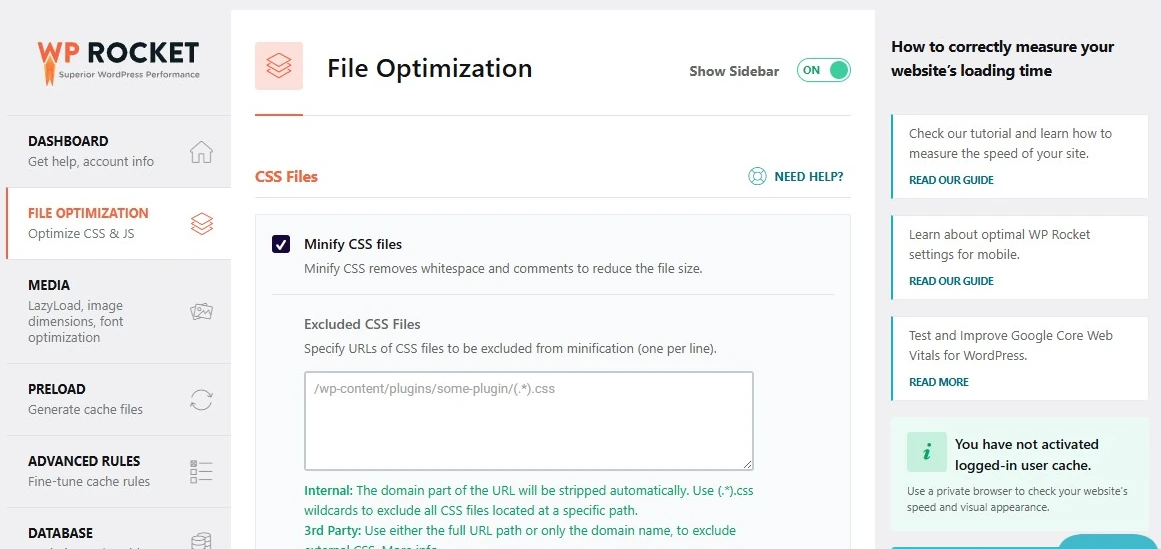
WP Rocket’s greatest advantage is its simplicity. As soon as you install and activate it, caching begins automatically — no technical setup required. The clean dashboard makes it easy to enable advanced features like lazy loading, database cleanup, and file optimization.
For users following a WordPress speed optimization guide, WP Rocket removes the complexity by combining multiple optimization tools in one plugin.
2. Page and Browser Caching
Caching is the heart of every speed optimization plugin. WP Rocket stores static versions of your pages, so your server doesn’t have to regenerate them for every visitor. It also enables browser caching, ensuring repeat visitors experience lightning-fast load times.
This feature alone makes WP Rocket a strong contender for the best cache plugin for WordPress in this year.
3. File Optimization and Minification
WP Rocket automatically compresses and combines CSS, JavaScript, and HTML files. This reduces file sizes and the number of requests made to the server. You can easily toggle these options on or off, depending on your website’s compatibility with minified files.
4. Lazy Loading for Images and Videos
Lazy loading delays the loading of images and videos until users scroll near them. This greatly improves initial page speed and overall user experience, especially for media-heavy websites.
In short, WP Rocket handles media optimization effortlessly — another big plus for anyone looking to follow a WordPress speed optimization guide.
5. Database Optimization
Over time, WordPress databases collect unnecessary data like post revisions, spam comments, and transients. WP Rocket includes a built-in tool that helps clean and optimize the database with a single click, improving performance and reducing load time.
6. Preloading and Sitemap Integration
Unlike most caching plugins, WP Rocket preloads cached content automatically. This means your visitors will always access a pre-cached, fast-loading page. The plugin also integrates with your XML sitemap, ensuring all your pages are preloaded efficiently.
7. Compatibility and Integration
WP Rocket works seamlessly with popular plugins and themes, including WooCommerce, Elementor, and Yoast SEO. It’s also compatible with CDN providers, which helps improve speed for global audiences.
This wide compatibility strengthens its case as the best cache plugin for WordPress, even in this year.
WP Rocket vs W3 Total Cache
| Ease of Use | Extremely user-friendly; setup takes minutes |
| Performance Boost | High performance with automatic optimization |
| Support | Excellent premium support |
| Features | Built-in lazy loading, database cleanup, and preloading |
| Pricing | Paid (starts around $59/year) |
| Ease of Use | Complex setup; not beginner-friendly |
| Performance Boost | Great results but requires manual tuning |
| Support | Community-based, limited free support |
| Features | Focused mainly on caching and CDN integration |
| Pricing | Free version available |
If you want a simple, all-in-one solution that requires little effort, WP Rocket wins easily. However, if you’re an advanced user comfortable with complex settings, W3 Total Cache can still deliver solid results.
Overall, WP Rocket continues to hold the edge in the WP Rocket vs W3 Total Cache comparison — especially for users seeking the best cache plugin for WordPress that just works out of the box.
How WP Rocket Improves Core Web Vitals
Google’s Core Web Vitals — metrics like Largest Contentful Paint (LCP), First Input Delay (FID), and Cumulative Layout Shift (CLS) — are now critical for SEO. WP Rocket directly improves these metrics by:
- Reducing server response time through caching
- Minimizing render-blocking scripts
- Optimizing images and videos with lazy loading
- Preloading key pages for faster access
If you’re following a WordPress speed optimization guide, you’ll see that WP Rocket covers nearly every recommendation needed to boost your Core Web Vitals scores.
Pros and Cons of WP Rocket
✅ Pros
- Extremely beginner-friendly
- Comprehensive caching and optimization tools
- Improves Google PageSpeed Insights scores
- Works with most hosting providers and plugins
- Regular updates and excellent customer support
❌ Cons
- No free version (premium-only plugin)
- Some features may overlap with other optimization tools
- Advanced users might prefer more manual control
Even with these minor drawbacks, WP Rocket remains one of the most effective and user-friendly tools for anyone serious about website performance.
Real-World Performance Results
In multiple speed tests conducted by WordPress professionals, WP Rocket consistently delivers impressive results. Websites using the plugin have shown:
- Up to 70% faster loading times
- Better PageSpeed Insights and GTmetrix scores
- Reduced bounce rates and higher engagement
When compared to other caching plugins like W3 Total Cache or WP Super Cache, WP Rocket’s automatic optimization and minimal setup time make it the best cache plugin for WordPress for most users in this year.
Pricing and Plans
WP Rocket offers three pricing tiers:
- Single – $59/year for one website
- Plus – $119/year for three websites
- Infinite – $299/year for unlimited websites
All plans come with one year of updates and premium support. Considering the performance benefits and ease of use, many users find WP Rocket to be a worthwhile investment for their WordPress speed optimization efforts.
How to Use WP Rocket Effectively
Even though WP Rocket is simple to set up, here are some quick tips to get the best results:
- Enable caching and preloading immediately after installation.
- Turn on lazy loading for images and videos to reduce initial load times.
- Use database cleanup weekly to keep your site lightweight.
- Integrate a CDN for global speed improvement.
- Test your site speed with tools like GTmetrix or Google PageSpeed Insights after every major change.
Following these steps ensures that WP Rocket performs at its full potential, helping you maintain the best cache plugin for WordPress experience throughout the year.
WP Rocket and Future Updates
WP Rocket’s development team is known for consistent updates and improvements. In this year, they’ve added enhanced compatibility with newer WordPress versions, advanced preloading mechanisms, and better support for modern hosting environments.
As website speed standards evolve, WP Rocket continues to innovate — keeping its position as the leader in caching and optimization tools for WordPress.
Conclusion
After testing and comparing its performance, usability, and overall value, the answer is clear. Yes, WP Rocket remains the best cache plugin for WordPress in this year.
It’s fast, reliable, and incredibly easy to use. Whether you’re managing a personal blog, eCommerce store, or business website, WP Rocket can drastically improve your site’s loading time and SEO performance.
If your goal is to boost your website’s speed without wasting time on complicated configurations, WP Rocket is the perfect solution. Combine it with a solid WordPress speed optimization guide, and you’ll have a powerful setup that keeps your site fast and competitive all year long.